
Last Updated: November 4, 2026
Quick Summary
Desk work neck tension eases when you raise your screen to eye level, sit about an arm’s length from it, and break up long stretches of sitting. Take a short movement break every 30 minutes, then add gentle neck and shoulder stretches. Seek a qualified health professional if symptoms spread to your arms or persist.
- Place the top of your monitor at or just below eye level.
- Sit roughly an arm’s length away from your screen.
- Do a shoulder roll and stand up every 30 minutes.
- Hold gentle side tilts and rotations for 15 to 20 seconds each.
- Seek medical advice for pain, numbness or tingling spreading down your arms.
Table of Contents
- Why Desk Work Leads to Neck Tension
- Setting Up Your Desk to Ease Neck Strain
- A Timed Movement Break Routine for Office Workers
- Neck Stretches for Desk Workers, Step by Step
- Work Habits That Support Your Neck Beyond Posture
- When to Seek Help for Neck Tension and Booking Your Next Step
- Frequently Asked Questions
Neck tension from desk work is one of the most common complaints among Melbourne office workers, and most of it builds up slowly, so understanding desk work neck tension early makes it easier to manage. Small changes to your workstation, regular movement breaks and a few gentle exercises can ease the strain over time. This practical guide explains how to reduce desk work neck tension, step by step, so you can start today.
Why Desk Work Leads to Neck Tension
Neck tension is the feeling of tightness or stiffness in the muscles at the back and sides of the neck. It often spreads into the shoulders and upper back. Long hours at a screen keep these muscles working without a break, and they rarely get the chance to relax.
How forward head posture builds strain
Forward head posture happens when the head drifts ahead of the shoulders. For every centimetre the head moves forward, the neck muscles have to work harder to hold it up. Many people call this “tech neck,” and it is one of the most common causes of desk-related strain.
Watch for these signs:
- Your chin sits forward when you look at your screen
- Your shoulders round toward your chest
- You feel tightness at the base of your skull by the end of the day
- Your neck feels stiff after you stand up from your desk
Muscle tension versus warning signs
Some tightness after a long day at a desk is normal. Muscle tension usually eases with rest, movement and a change of position. Warning signs are different. Seek medical advice if you notice pain that spreads down one or both arms, numbness or tingling, weakness in the hands, dizziness, or a severe headache that comes on suddenly (Neck pain). These symptoms need prompt assessment by a qualified health professional.
Setting Up Your Desk to Ease Neck Strain
Your workstation has a big effect on your neck. Small adjustments can reduce the load on your muscles without any cost.
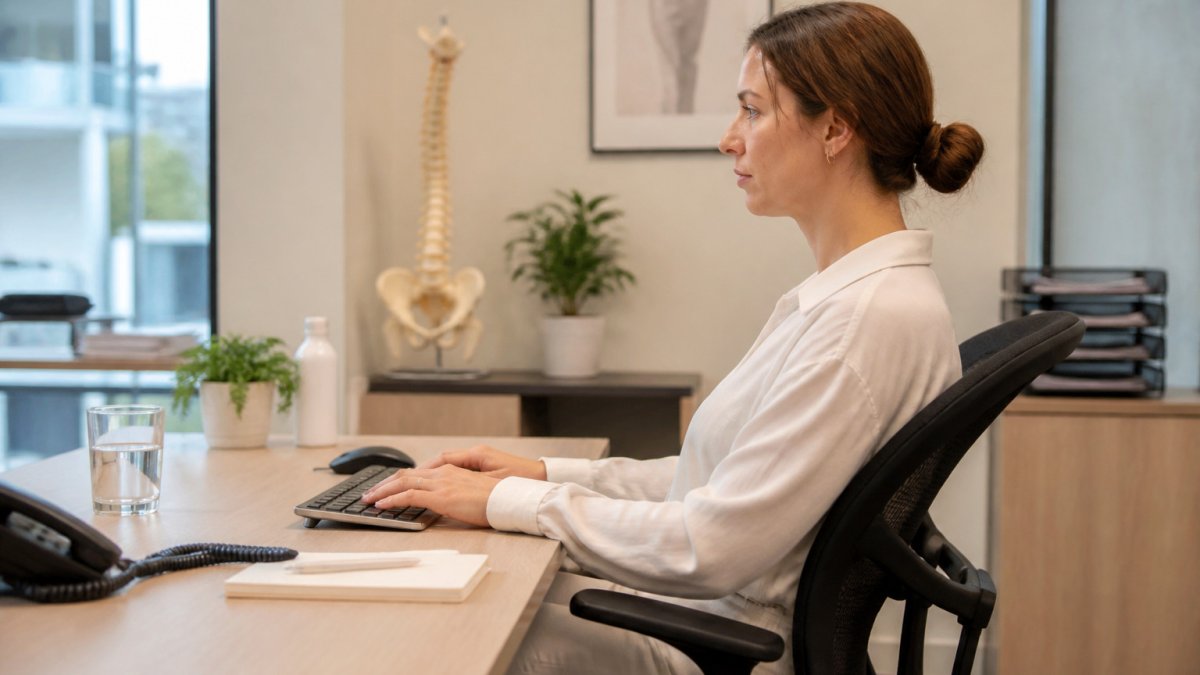
- Screen height: Place the top of your monitor at or just below eye level.
- Screen distance: Sit roughly an arm’s length from the screen.
- Laptop use: Raise the laptop on a stand and use a separate keyboard and mouse.
- Keyboard and arms: Keep your elbows near your sides, with forearms resting at a comfortable angle.
- Phone calls: Use a headset rather than holding the phone between your ear and shoulder.
- Chair support: Set your chair so your feet rest flat on the floor and your lower back is supported.
Checking your setup at the start of each week can help, since small shifts in where you place your screen can add up over time.
A Timed Movement Break Routine for Office Workers
Your neck needs regular changes in position, not one big stretch at the end of the day. For more ways to ease ongoing shoulder tension, see a dedicated shoulder tension guide. A simple timed routine helps, but the schedule only works if it fits the way you actually work. Use the framework below as a starting point, then adjust the intervals to your day.
The base schedule
- Every 30 minutes: Stand up, roll your shoulders backward five times, and let your arms hang for a few seconds. This interrupts the static load on your neck and upper back.
- Every hour: Walk for two to three minutes, to a water fill-up, a bathroom break, or simply to the far end of the office and back. Walking also gives your eyes a break from close focus.
- Every two hours: Do the full set of gentle neck and shoulder movements described in the next section. Keep it to two or three minutes.
- End of day: Spend five minutes stretching your neck and upper back before you leave your desk, so tension does not carry into your evening.
Set a recurring reminder on your phone or calendar. Most people find that a silent vibration or a calendar pop-up works better than an alarm, especially in shared workspaces.
Adapting the routine to different workdays
A fixed schedule rarely survives a day full of back-to-back meetings or a laptop-only setup away from your usual desk. Adjust rather than abandon:
- Meeting-heavy days: Use the first minute after each meeting ends for a shoulder roll and a short walk, even if it is not the 30-minute mark. The change of position matters more than the exact timing.
- Laptop-only days: You will likely spend more time looking down, so shorten the interval between neck movements to every 60-90 minutes and raise the laptop on a stand or a stack of books where possible.
- Deep-focus blocks: If you cannot break a task, set a timer for 45 minutes maximum and treat the break as part of the task, not an interruption.
- Work-from-home days: Without a commute or office walk, add one longer walk at lunchtime to replace the incidental movement you would otherwise get.
Tracking whether it is helping
A simple log makes the routine more useful. For one to two weeks, note three things at the end of each workday: your neck tension on a 0-10 scale, roughly how many breaks you took, and any change you made to your setup.
Watch out: if you find yourself skipping breaks because you are too busy, the routine is too ambitious, cut it to the 30-minute shoulder roll and one hourly walk, and build from there. (Source: guidelines for ergonomic workstation setup)
Neck Stretches for Desk Workers, Step by Step
Perform these movements slowly and stay within a comfortable range. Never force a stretch or push into sharp pain. The aim is gentle, repeated movement rather than a strong end-of-range stretch.
The basic set
- Gentle side tilt: Sit tall. Slowly tilt your right ear toward your right shoulder. Hold for 15 to 20 seconds, then repeat on the left. Keep the opposite shoulder relaxed rather than pulling it down.
- Slow rotation: Turn your head to look over one shoulder. Hold for 10 seconds, then repeat on the other side. Keep the movement smooth and stop before you feel pinching.
- Shoulder rolls: Lift your shoulders toward your ears, roll them back and down. Repeat five times. Move slowly enough that you can feel the shoulder blades travel.
- Scapular squeeze: Gently draw your shoulder blades together and hold for five seconds. Repeat five times. Keep your shoulders down rather than shrugging them up toward your ears.
A common pattern is to do this set once in the morning and once in the afternoon. If your neck feels better with more frequent, shorter sessions, two minutes every couple of hours is fine.
Chin tucks and deep neck flexor work
Chin tucks help train the deep muscles that support the neck. Sit or stand tall with your shoulders relaxed. Gently draw your chin straight back, as if making a small double chin, without tipping your head down. Hold for five seconds and repeat 8 to 10 times. Many people find this exercise helpful during long calls or screen work because it can be done without leaving your chair.
Start with 8 repetitions and build to 10 over a week or two. Quality matters more than quantity, a small, controlled movement is more useful than a large one that involves the whole head tipping.
Common mistakes to avoid
- Bouncing or jerking: Stretches should be held still or moved slowly. Bouncing can provoke the muscles you are trying to relax.
- Stretching into pain: A mild stretch sensation is fine; sharp pain, tingling or numbness is not.
- Holding your breath: Breathe normally throughout. Holding your breath tends to increase muscle tension.
- Skipping the shoulders: Much neck tension is driven by the upper back and shoulders, so do not leave out the scapular work.
- Overdoing it: More is not better. A few minutes, done consistently, is more effective than a long session once a week.
When to stop and seek advice
Stop any movement that causes sharp pain, dizziness, numbness or tingling into the arm or hand. Seek assessment from a qualified health professional before continuing if you have a recent neck injury, a history of spinal problems, or pain that does not improve after a couple of weeks of gentle movement. Seek urgent care for pain that spreads down one or both arms, weakness in the hands, dizziness, or a severe headache that comes on suddenly.
Watch out: if a stretch feels good while you do it but your neck is stiffer an hour later, you are likely pushing too far, reduce the range and hold time.
Work Habits That Support Your Neck Beyond Posture
Posture matters, but no position is good for hours on end. Try these habits:
- Vary your tasks: Alternate screen work with reading on paper or phone calls.
- Stand when you can: Use a standing desk or stand during meetings.
- Keep reading material at eye level: Use a document holder so you are not looking down.
- Sleep with a supportive pillow: A pillow that keeps your neck in line with your spine can ease morning stiffness.
- Manage stress: Tension often rises with stress, so brief breathing breaks help your shoulders drop.
Be patient. Changes in habit often take several weeks to feel clearly different.
When to Seek Help for Neck Tension and Booking Your Next Step
If your neck tension lasts more than a few weeks, keeps returning, or affects your sleep or work, it is worth getting a professional assessment. Seek urgent care for any of the warning signs listed earlier.
A qualified practitioner can look at your posture, movement and daily habits, then talk through options that suit you. Learn what a remedial massage session involves if you want hands-on relief from desk-related back and neck strain. A qualified health professional can discuss your neck tension with you and what support may help. Book a consultation with a qualified practitioner to talk through your symptoms.
Frequently Asked Questions
How can I reduce neck tension from sitting at a desk?
Start by lifting your screen so the top of it sits near eye level, keeping your elbows close to your body and your feet flat on the floor. Change position regularly rather than holding one posture for hours, and take short movement breaks every 30 to 60 minutes to stand, walk briefly and roll your shoulders. Small, repeated adjustments usually matter more than one perfect setup. If tension persists for several weeks despite these changes, book a consultation with a qualified health professional to discuss your symptoms.
What is the best posture for preventing neck tension at a computer?
Aim for a neutral position where your ears sit roughly over your shoulders and your head is balanced rather than pushed forward. Keep your back supported against the chair, your shoulders relaxed and your wrists in a comfortable line with your forearms. Avoid cradling a phone between your ear and shoulder. Posture changes are easiest to maintain when you alternate them with movement, so do not treat any single position as a fixed rule.
When should I seek professional advice about neck tension?
Consider seeing a health professional if neck pain lasts more than a few weeks, wakes you at night, spreads into your arms, or comes with numbness, tingling, weakness, dizziness or headaches that are new or worsening. These signs can point to problems that need proper assessment rather than self-management. A consultation can help you understand what is happening and which options may suit you.
Can a poorly set-up workstation contribute to neck tension?
Yes. A screen that is too low, a keyboard that sits too far away, or a laptop used on a desk without a stand all encourage the head to tilt forward for long periods. Over time this loads the muscles at the back of the neck and across the shoulders. Adjusting screen height, bringing input devices closer and using a laptop stand or external keyboard are common, low-cost changes that many office workers find helpful.


